Bulk Editing Child Table Fields in Frappe v15 List View
Frappe v15 lets you bulk edit records from the List View, but only parent-level fields. If you need to update a field inside a child table — like a rate, date, or status inside Items — the option simp
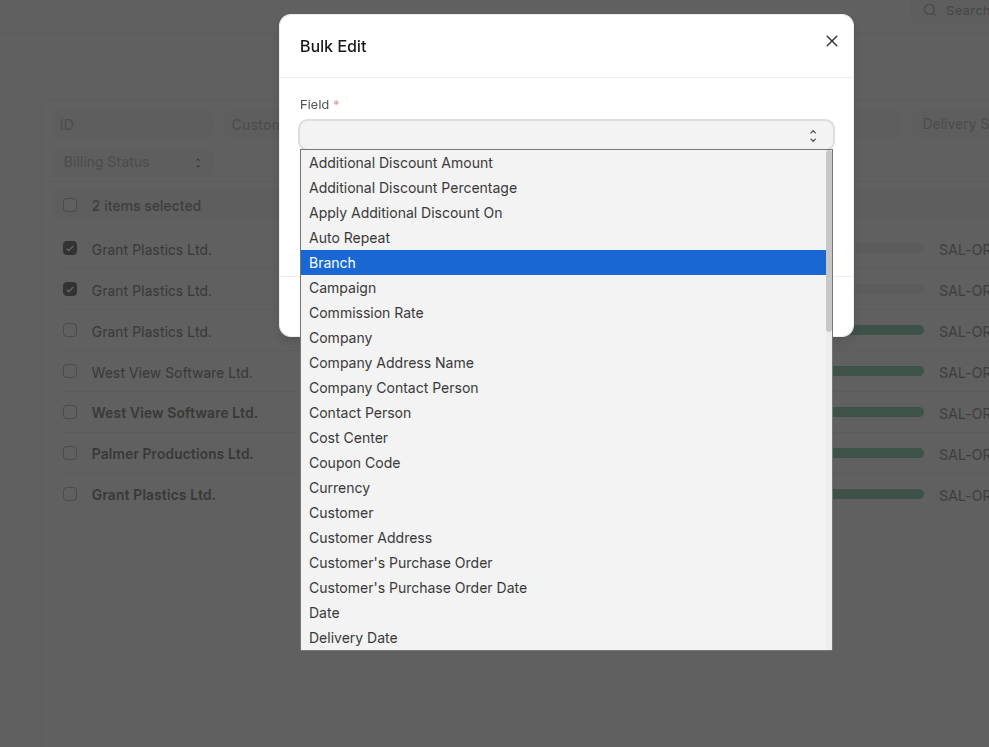
 Frappe v15 ships with a bulk edit feature in the List View. You select multiple records, click Actions > Edit, pick a field, set a value, and it updates all selected documents. It is a useful feature, but it has a hard limitation: it only exposes fields from the parent doctype. If you want to update a field inside a child table — say, a status field inside Items or Taxes — you are out of luck in v15.
This limitation was addressed in Frappe v16, where child table fields were added to the bulk edit dialog. But many production deployments are still on v15 and upgrading is not always an option. This post walks through how to backport that capability into a custom Frappe app without touching the Frappe core.
Before and After
Before — Frappe v15 default: only parent fields
After — With the override: parent and child table fields
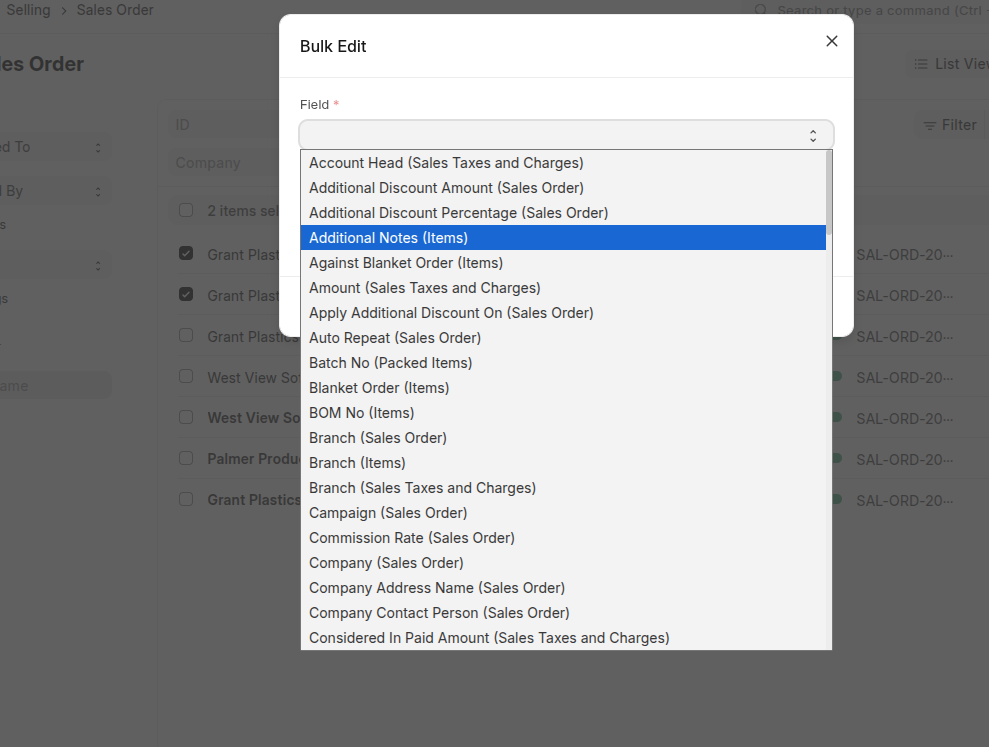
The field names in the patched version follow the format Field Label (Table Label)
so you can clearly tell which doctype each field belongs to.
What We Are Overriding and Why
The bulk edit flow in Frappe's List View involves two parts:
list_view.js — get_actions_menu_items()
This method builds the Actions dropdown. Inside it, a bulk_edit() closure constructs field_mappings — a dictionary of editable fields passed to bulk_operations.edit(). In v15, this only iterates parent doctype fields. In v16, it also iterates Table fieldtype children.
bulk_operations.js — edit()
This method receives field_mappings and renders the dialog. It also calls frappe.call to push the update to the server via submit_cancel_or_update_docs.
The server-side method submit_cancel_or_update_docs in v15 only does doc.update(data) followed by doc.save(). It has no concept of child table updates. So we need to override that too.
The Plan
- Override
ListView.prototype.get_actions_menu_itemsin a custom app JS file to include child table fields infield_mappings. - Replace the
editaction with a custom_patched_editfunction that handles theis_child_fieldflag and sends a structuredchild_table_updatespayload to the server. - Write a custom Python whitelisted method that handles both parent field updates and child table row updates.
- Register everything in
hooks.py.
We do not touch Frappe core. Everything lives in the custom app.
Step 1: Understanding the Field Mappings Structure
In the original v15 code, field_mappings looks like this:
{
  "Status": { fieldname: "status", fieldtype: "Select", ... },
  "Description": { fieldname: "description", fieldtype: "Data", ... }
}
We extend this to include child table fields by adding metadata about which child doctype and parent table fieldname they belong to:
{
  "Status (Sales Order)": { fieldname: "status", is_child_field: false, ... },
  "Delivery Date (Items)": {
    fieldname: "delivery_date",
    is_child_field: true,
    child_doctype: "Sales Order Item",
    parent_table_field: "items",
    ...
  }
}
The key format Field Label (Parent or Child Table Label) avoids collisions when parent and child have fields with the same label.
Step 2: Frontend Override — bulk_operations_override.js
Create this file in your custom app:
your_app/public/js/bulk_operations_override.js
Part A: Override get_actions_menu_items
We call the original method first to get all existing items, then find the Edit item and replace only its action. This is the minimal change — we are not rewriting the entire method.
frappe.after_ajax(() => {
    if (!frappe.views?.ListView) return;

    const _orig_get_actions = frappe.views.ListView.prototype.get_actions_menu_items;

    frappe.views.ListView.prototype.get_actions_menu_items = function () {
        const items = _orig_get_actions.call(this);

        const edit_item = items.find((item) => item.label === __("Edit"));
        if (!edit_item) return items;

        const doctype = this.doctype;

        const is_field_editable = (field_doc) => {
            return (
                field_doc.fieldname &&
                frappe.model.is_value_type(field_doc) &&
                field_doc.fieldtype !== "Read Only" &&
                !field_doc.hidden &&
                !field_doc.read_only &&
                !field_doc.is_virtual
            );
        };

        edit_item.action = () => {
            let field_mappings = {};

            frappe.meta.get_docfields(doctype).forEach((field_doc) => {
                // Parent doctype fields
                if (is_field_editable(field_doc)) {
                    const field_key = `${field_doc.label} (${doctype})`;
                    field_mappings[field_key] = Object.assign({}, field_doc, {
                        is_child_field: false,
                    });
                }

                // Child table fields
                if (field_doc.fieldtype === "Table" && field_doc.options) {
                    const child_doctype = field_doc.options;
                    frappe.meta.get_docfields(child_doctype).forEach((child_field) => {
                        if (is_field_editable(child_field)) {
                            const field_key = `${child_field.label} (${field_doc.label})`;
                            field_mappings[field_key] = Object.assign({}, child_field, {
                                is_child_field: true,
                                child_doctype: child_doctype,
                                parent_table_field: field_doc.fieldname,
                            });
                        }
                    });
                }
            });

            this.disable_list_update = true;
            _patched_edit.call(
                { doctype },
                this.get_checked_items(true),
                field_mappings,
                () => {
                    this.disable_list_update = false;
                    this.refresh();
                }
            );
        };

        return items;
    };
});
Two things worth noting here:
_orig_get_actions.call(this)preserves all other actions — Export, Assign, Print, Delete, Submit, Cancel. We only patch the Edit action._patched_edit.call({ doctype }, ...)passes doctype as thethiscontext. The function usesthis.doctypeinternally, so we pass a plain object instead of the full listview instance.
Part B: The Patched Edit Dialog
This function renders the Bulk Edit dialog and handles the server call. The key differences from the v15 original:
- It reads
is_child_field,child_doctypefrom the selected field mapping. - For child fields, it wraps the update in a
child_table_updatesstructure that the custom Python method understands. - It calls our custom Python method instead of the default one.
function _patched_edit(docnames, field_mappings, done) {
    let field_options = Object.keys(field_mappings).sort((a, b) =>
        __(cstr(field_mappings[a].label)).localeCompare(cstr(__(field_mappings[b].label)))
    );

    const status_regex = /status/i;
    const default_field = field_options.find((value) => status_regex.test(value));

    const dialog = new frappe.ui.Dialog({
        title: __("Bulk Edit"),
        fields: [
            {
                fieldtype: "Select",
                options: field_options,
                default: default_field,
                label: __("Field"),
                fieldname: "field",
                reqd: 1,
                onchange: () => set_value_field(dialog),
            },
            {
                fieldtype: "Data",
                label: __("Value"),
                fieldname: "value",
                onchange() {
                    show_help_text();
                },
            },
        ],
        primary_action: ({ value }) => {
            const selected_field = field_mappings[dialog.get_value("field")];
            const { fieldname, is_child_field, child_doctype } = selected_field;

            dialog.disable_primary_action();

            let update_data = {};
            if (is_child_field) {
                update_data = {
                    child_table_updates: {
                        [child_doctype]: {
                            [fieldname]: value || null,
                        },
                    },
                };
            } else {
                update_data[fieldname] = value || null;
            }

            frappe
                .call({
                    method: "your_app.api.bulk_update.custom_submit_cancel_or_update_docs",
                    args: {
                        doctype: this.doctype,
                        freeze: true,
                        docnames: docnames,
                        action: "update",
                        data: update_data,
                    },
                })
                .then((r) => {
                    let failed = r.message || [];
                    if (failed.length && !r._server_messages) {
                        dialog.enable_primary_action();
                        frappe.throw(
                            __("Cannot update {0}", [
                                failed.map((f) => (f.bold ? f.bold() : f)).join(", "),
                            ])
                        );
                    }
                    done();
                    dialog.hide();
                    frappe.show_alert(__("Updated successfully"));
                });
        },
        primary_action_label: __("Update {0} records", [docnames.length]),
    });

    if (default_field) set_value_field(dialog);
    show_help_text();

    function set_value_field(dialogObj) {
        const new_df = Object.assign({}, field_mappings[dialogObj.get_value("field")]);
        if (
            new_df.label.match(status_regex) &&
            new_df.fieldtype === "Select" &&
            !new_df.default
        ) {
            let options = typeof new_df.options === "string" ? new_df.options.split("\n") : [];
            new_df.default = options[0] || options[1];
        }
        new_df.label = __("Value");
        new_df.onchange = show_help_text;
        delete new_df.depends_on;
        delete new_df.is_child_field;
        delete new_df.child_doctype;
        dialogObj.replace_field("value", new_df);
        show_help_text();
    }

    function show_help_text() {
        const value = dialog.get_value("value");
        dialog.set_df_property(
            "value",
            "description",
            value == null || value === ""
                ? __("You have not entered a value. The field will be set to empty.")
                : ""
        );
    }

    dialog.refresh();
    dialog.show();
}
Step 3: Backend Override — bulk_update.py
Create this file in your custom app:
your_app/api/bulk_update.py
The original submit_cancel_or_update_docs in v15 does doc.update(data) and doc.save(). It knows nothing about child_table_updates. Our version intercepts that key from the data payload, applies updates row-by-row to the child table, and then saves.
import frappe
from frappe.utils.scheduler import is_scheduler_inactive
from frappe import _
from frappe.core.doctype.submission_queue.submission_queue import queue_submission


@frappe.whitelist()
def custom_submit_cancel_or_update_docs(doctype, docnames, action="submit", data=None, task_id=None):
    if isinstance(docnames, str):
        docnames = frappe.parse_json(docnames)

    if len(docnames) < 20:
        return custom_bulk_action(doctype, docnames, action, data, task_id)
    elif len(docnames) <= 500:
        frappe.msgprint(_("Bulk operation is enqueued in background."), alert=True)
        frappe.enqueue(
            custom_bulk_action,
            doctype=doctype,
            docnames=docnames,
            action=action,
            data=data,
            task_id=task_id,
            queue="short",
            timeout=1000,
        )
    else:
        frappe.throw(
            _("Bulk operations only support up to 500 documents."),
            title=_("Too Many Documents")
        )


def custom_bulk_action(doctype, docnames, action, data, task_id=None):
    if data:
        data = frappe.parse_json(data)

    child_table_updates = data.get("child_table_updates") if data else None
    failed = []
    num_documents = len(docnames)

    for idx, docname in enumerate(docnames, 1):
        doc = frappe.get_doc(doctype, docname)
        try:
            message = ""
            if action == "submit" and doc.docstatus.is_draft():
                if doc.meta.queue_in_background and not is_scheduler_inactive():
                    queue_submission(doc, action)
                    message = _("Queuing {0} for Submission").format(doctype)
                else:
                    doc.submit()
                    message = _("Submitting {0}").format(doctype)

            elif action == "cancel" and doc.docstatus.is_submitted():
                doc.cancel()
                message = _("Cancelling {0}").format(doctype)

            elif action == "update" and not doc.docstatus.is_cancelled():
                # Apply child table updates
                if child_table_updates:
                    table_fields = doc.meta.get_table_fields()
                    for child_doctype, field_updates in child_table_updates.items():
                        table_fieldname = next(
                            (
                                field.fieldname
                                for field in table_fields
                                if field.options == child_doctype
                            ),
                            None,
                        )
                        if table_fieldname and hasattr(doc, table_fieldname):
                            child_meta = frappe.get_meta(child_doctype)
                            child_docs = getattr(doc, table_fieldname)
                            for child_doc in child_docs:
                                for fieldname, value in field_updates.items():
                                    if child_meta.has_field(fieldname):
                                        setattr(child_doc, fieldname, value)

                # Apply parent field updates (exclude child_table_updates key)
                if data:
                    parent_data = {
                        k: v for k, v in data.items() if k != "child_table_updates"
                    }
                    if parent_data:
                        doc.update(parent_data)

                doc.save()
                message = _("Updating {0}").format(doctype)

            else:
                failed.append(docname)

            frappe.db.commit()
            frappe.publish_progress(
                percent=idx / num_documents * 100,
                title=message,
                description=docname,
                task_id=task_id,
            )

        except Exception:
            failed.append(docname)
            frappe.db.rollback()

    return failed
A few things to call out in the Python:
- We check
child_table_updatesseparately from the rest ofdata. The original code calleddoc.update(data)on everything, which would have tried to setchild_table_updatesas a field on the parent doc and silently failed or errored. - We use
child_meta.has_field(fieldname)as a safety check before callingsetattr. This prevents bad data from crashing the update loop for every document. - The threshold logic (20 inline, 20-500 enqueued, 500+ rejected) mirrors the original method so behavior stays consistent.
Step 4: Register Everything in hooks.py
# hooks.py

app_include_js = [
    "/assets/your_app/js/bulk_operations_override.js"
]
Then build and clear cache:
bench build --app your_app
bench clear-cache
Hard refresh the browser after the build completes.
How It Works End to End
- User opens any List View, selects multiple records, and clicks Actions > Edit.
- Our overridden
get_actions_menu_itemsruns. It calls the original method first, then replaces the Edit action. - The new action iterates parent fields and also iterates through every
Tablefieldtype field, fetching child doctype fields usingfrappe.meta.get_docfields. - The
_patched_editdialog opens with the full field list, now including entries likeDelivery Date (Items)orRate (Taxes and Charges). - User picks a child field. The dialog dynamically replaces the Value field with the correct fieldtype (Date, Currency, Select, etc.) using
replace_field. - On submit, if
is_child_fieldis true, the update payload becomes{ child_table_updates: { "Sales Order Item": { delivery_date: "2025-01-01" } } }. - The custom Python method receives this, iterates every row in the child table of each selected document, and applies the value using
setattr. doc.save()is called once per document after all updates are applied.
Limitations and Things to Know
All child rows are updated. When you bulk edit a child table field, every row in that child table gets the new value. There is no row-level filtering. This is intentional and matches how v16 implements it.
Validation still runs. Since we call doc.save(), all doctype-level validate hooks run. If a value is invalid for a specific document, that document ends up in the failed list and the rest continue.
Linked and Dynamic Link fields in child tables will appear in the dropdown but may need the target doctype populated for the Value field to behave correctly. frappe.meta.get_docfields returns the full field meta, so options should be set correctly for Link fields.
Upgrade note. When you move to Frappe v16, this override becomes redundant. The get_actions_menu_items prototype patch calls the original method first, so on v16 the original already returns the correct behavior. You would just want to remove the override to avoid double-listing child fields. Keep a note in your app changelog.
The frappe.after_ajax wrapper is important. It ensures the frappe.views.ListView class is fully loaded before we attempt to patch its prototype. Without it, the prototype patch may run before the class is defined and silently do nothing.
File Structure Summary
your_app/
    public/
        js/
            bulk_operations_override.js   # JS override
    api/
        bulk_update.py                    # Python override
    hooks.py                              # app_include_js registration
Conclusion
This is a clean, non-invasive way to backport a v16 feature into a v15 deployment. No core files are modified. The override is additive — it calls the original method and extends only what needs to change. The Python side is a direct replacement method registered under a custom path, so it does not interfere with other doctypes or Frappe internals.
The same pattern — call original, find item, replace action — can be used to customize other bulk operations in the List View without forking Frappe.
No comments yet. Login to start a new discussion Start a new discussion